WHEELTOP EDS TX Wireless Electronic Groupset 2x3-14 Speed Road Bike Rim Brake

WHEELTOP EDS TX Wireless Electronic Road Groupset, 2x, Rim Brake, Carbon Fiber Cage Plate

£339.00
Skip to product information
WHEELTOP EDS TX Wireless Electronic Groupset 2x3-14 Speed Road Bike Rim Brake

WHEELTOP EDS TX Wireless Electronic Road Groupset, 2x, Rim Brake, Carbon Fiber Cage Plate

£339.00

View store information

WHEELTOP EDS TX Wireless Electronic Road Groupset, 2x, Rim Brake, Carbon Fiber Cage Plate

WHEELTOP EDS TX — Rim Brake, Carbon Fiber Cage Plate

A fully wireless electronic shifting kit purpose-built for road bikes and drop-bar bicycles. Front and rear derailleurs shift on a button press — no cables, no housing, no barrel adjusters. Supports cassettes up to 36T. 2X (double chainring, front derailleur included) configuration. The rear derailleur ships with a standard carbon fiber cage plate, and the shift levers are carbon fiber, pairing with your existing rim brake calipers — no hydraulic lines, no caliper changes required.

Before you order, please check

Brake type

This is the rim brake version. Please make sure it matches your bike's brakes.

Front derailleur

Braze-on mount. If your frame has no braze-on tab, a clamp-on adapter can be used on a round seat tube. We can supply one, just message us.

WHEELTOP EDS TX rim brake wireless electronic groupset — rear derailleur, front derailleur, and carbon fiber shift levers

The Complete Shift Kit

Electronic Rear Derailleur — Carbon Fiber Cage Plate
Electronic Front Derailleur
Carbon Fiber Left Rim Brake Lever
Carbon Fiber Right Rim Brake Lever

Electronic Rear Derailleur — 7–14 Speed, App-Configurable

EDS TX rear derailleur with carbon fiber pulley cage

EDS TX Electronic Rear Derailleur

Driven by a built-in 800mAh rechargeable battery at 7.4V, the EDS TX rear derailleur shifts instantly on a button press — zero cable lag, zero stretch over time. The exact speed count is configured through the WHEELTOP app — supports cassettes up to 36T. The standard carbon fiber cage plate uses a 12-tooth positive/negative tooth profile for quieter, more secure chain engagement. Charges through a magnetic Pogopin connector — snap it on, no port covers, no corrosion.

Electronic Front Derailleur — Included

Ships with both the front derailleur and rear derailleur, ready to install.

EDS TX front derailleur

Precise Front Shifting on Demand

The EDS TX front derailleur runs on its own built-in 500mAh 7.4V rechargeable battery and shares the same magnetic Pogopin charging, and BLE/ANT+ wireless link as the rear unit. Pair both derailleurs to the WHEELTOP app for synchronized setup, gear mapping, and live status — front and rear shift in concert with a single button press from the lever.

FD Battery

500mAh / 7.4V

Built-in rechargeable lithium

Charging

Pogopin Magnetic

Red = charging, light off = full

Wireless

BLE / ANT+

Pairs with cycling computers

Weight

191.3g

Included

Rim Brake — Carbon Fiber Lever

The EDS TX Rim Brake build pairs a carbon fiber lever body with your existing rim brake calipers — electronic shifting precision, zero cable clutter, zero changes to your braking setup.

EDS TX rim brake carbon fiber shift lever on road bike drop bar

Carbon Fiber Body. Rim Brake Compatible.

The carbon fiber lever body is lightweight, rigid, and built to pair with your existing rim brake cable. Shift electronically on a button press while braking through the lever in the same motion you already know.

Left Lever

202.3g

Right Lever

214.6g

Material

Carbon Fiber

Battery

CR2032

Full Control from Your Phone

Download the WHEELTOP app to pair, tune, and monitor your drivetrain — all from your handlebars.

4 Steps to Get Riding

WHEELTOP app searching for and selecting the EDS TX device
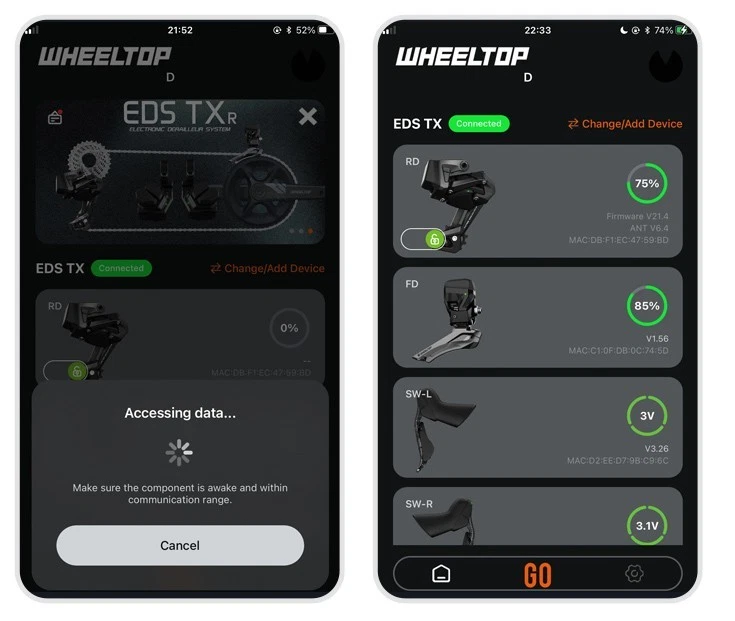
WHEELTOP app connecting and showing all four components with battery levels

Step 1

Pair Your Components

Open the WHEELTOP app and tap + Start Using. It searches for nearby EDS TX components over Bluetooth, showing a Searching for devices screen. Once your derailleur turns up, select it and name it yourself, then tap Finish — the app connects automatically, showing an Accessing data… prompt while it pairs — just keep the derailleur powered on and within range. When it's done, the screen switches to Connected, and the home screen lists all four components — rear derailleur, front derailleur, and both shift levers — each showing its live battery reading, with the rear and front derailleur cards also listing firmware version and MAC address.

All Four Components, One Screen

The Connected view puts the rear derailleur, front derailleur, and both shift levers on one screen, so you can check every component's charge level at a glance before a ride.

WHEELTOP app flywheel settings screen

Step 2

Set Your Cassette Speed

Tap the settings icon in the bottom corner, then open Flywheel Settings and select your cassette's brand and speed so the derailleur knows exactly how many gears to index across.

WHEELTOP app initial calibration screen

Step 3

Run Initial Calibration

Shift the rear derailleur onto the smallest cog and the front derailleur onto the largest chainring, then start calibration in the app.

Guided On-Screen Alignment

No guesswork — use the on-screen +R / −L controls to nudge the guide pulley until it sits precisely under the smallest sprocket, then tap Finish.

WHEELTOP app gear fine-tuning screen

Step 4

Fine-Tune Every Gear

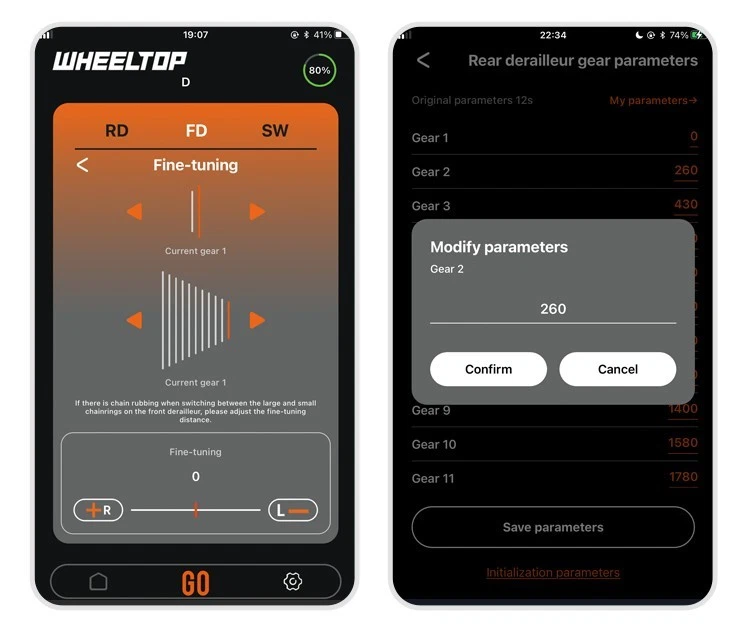
If you notice any chain rub when shifting between chainrings, dial in each gear individually on the Fine-Tuning screen.

Need to Go Further?

Open Rear Derailleur Gear Parameters to view or manually edit the exact position value for any gear, then save — a level of precision cable systems simply can't match.

Other Settings

WHEELTOP app shift button customization screen

Customize Your Shift Buttons

Assign what each button on the left and right shift levers does — no two riders shift the same way.

Set It Once, Ride Your Way

Reassign the SW-L and SW-R paddles to trigger whichever shift function feels natural, or tap Factory Restore to reset instantly.

WHEELTOP app home screen and ride computer

Ride Data and Turn-by-Turn Navigation

Switch to the ride screen for distance tracking and a full history of past rides — each entry logged with duration, average speed, and calories burned.

Live Stats While You Ride

Tap GO in the bottom bar to switch into the ride screen, where elapsed time, calories, pace, average heart rate, cumulative shifts, and climb update in real time alongside turn-by-turn map navigation.

WHEELTOP app firmware update screen

One-Tap Firmware Updates

When a new firmware version is available, the app flags it right on the home screen for the affected component.

Stay Current, Wirelessly

Tap to review what's new, then update over the air — just make sure the component has enough charge before you start.

Two Riding Modes. One Tap to Switch.

WHEELTOP app Standard and Racing mode switch screen

Switch between Standard and Racing mode directly in the app. Each mode is tuned for a different riding style — no tools, no hassle.

Standard Mode

Auto-sleep when idle. Lower power draw, longer battery life. Perfect for long days in the saddle.

Racing Mode

Always-on, maximum responsiveness. Boosted signal power for noise-resistant shifting under pressure.

36T
Max cassette size
20,000+
Shifts per RD charge
BLE+ANT+
Dual-protocol wireless

Specifications

Full technical breakdown of the EDS TX wireless electronic shifter/derailleur kit.

Brand
WHEELTOP
Model
EDS TX Wireless Electronic Shifter / Derailleur Kit — Rim Brake, Standard Carbon Cage
Suitable For
Road bikes, gravel bikes, cyclocross bikes — drop-bar bicycles with front derailleur mount, rim brake calipers
Speed Range
7–14 Speed (customizable via WHEELTOP app)
Cassette Compatibility
Up to 36T max
Rear Derailleur Pulley
Standard carbon fiber cage plate, 12-tooth positive/negative tooth profile
Wireless Protocol
BLE / ANT+ — pairs with cycling computers, displays current gear position and battery level
Charging Port
Pogopin magnetic connector · Red light = charging, light turns off when fully charged
Battery Capacity
Rear derailleur 800mAh · Front derailleur 500mAh · System voltage 7.4V
Shifter Battery
CR2032 button cell (tool-free replacement)
Lever Material
Carbon Fiber
Weight
Front derailleur 191.3g · Rear derailleur 336.6g · Left lever 202.3g · Right lever 214.6g
Warranty
1-Year Warranty

What's in the Box

Complete kit — everything needed to install and pair the electronic drivetrain.

×1

EDS TX Electronic Rear Derailleur — Standard Carbon Cage

×1

EDS TX Electronic Front Derailleur

×2

Integrated Rim Brake Shift Levers — Carbon Fiber (Left + Right)

×1

Pogopin Magnetic Charging Cable

×1

Quick-Start Guide (scan QR code for installation video & instructions)

Quality Check & Return Inspection

Every order is checked, photographed, filmed and weighed before it ships, and every return is checked against those records.

Inspected and Tested Before Dispatch

Every groupset is brand new, and each one is inspected, paired and tested before it leaves us. That's why it reaches you new, fully working and free of marks, ready to fit.

Photographed, Filmed and Weighed

Each order is photographed and filmed when packed, and the parcel weight is recorded at dispatch.

Gift Box and Wooden Box

Ships in a printed "HELLO!" gift box with a zip tear strip. Inside, every electronic part is bubble-wrapped, sealed in a white frosted bag and packed in a wooden box: a free upgrade for 360° protection against crush damage in transit.

Returns Checked on Arrival

Every return is photographed and filmed when it's opened, and compared with our dispatch photos and video. It must be the item we sent, complete. Please return it in the original wooden box. Missing or different items are handled under our returns policy.

Having trouble with setup? Email us at support@aoeagle.com first. Most issues are fixed in a few minutes.

Check Your Derailleur Hanger

Please complete these two checks before fitting the WHEELTOP rear derailleur. Only install it once both are confirmed.

Check 1

Is the Hanger Straight?

Bent derailleur hanger compared with a straight hanger

A bent hanger tilts the rear derailleur, which causes poor shifting, chain noise and difficult calibration, no matter how carefully it is set up.

How to check: look from behind the bike. The hanger should hang straight down, parallel to the cassette cogs. If it is bent, straighten it with a hanger alignment tool or fit a new hanger.

Check 2

Does the Hanger Have a Step?

Derailleur hanger with a clear step: compatible
Compatible

Clear step at the bottom

Derailleur hanger with a very small step: not compatible
Not compatible

Very small step

The small tab next to the mounting bolt must rest on the step at the bottom of the hanger, so the derailleur can swing forward and back.

Small step? Fit a hanger with a larger step, or a derailleur hanger extender. Otherwise the derailleur stays rigid and cannot be set up.

Not sure? Send us a close-up photo of your hanger by email to support@aoeagle.com before ordering, and we will check it for you.

Compatibility & Buyer Notes

Please review the following before purchasing to ensure correct fitment.

This Listing is for Rim Brake Only

The levers included are rim brake levers — compatible with standard caliper brake cable pull. If you ride a disc-brake frame, please see our separate disc brake listing. Rim and disc brake levers are not interchangeable.

Speed Count Fully Configurable in the App

Speed count isn't fixed by the hardware — set anywhere from 7-speed to 14-speed directly in the WHEELTOP app to match your cassette. Verify your current cassette is 36T or smaller before ordering.

App Pairing Required Before First Ride

After installation, pair both derailleurs to the WHEELTOP app over BLE, set your speed range, and run gear calibration. The app is free on iOS and Android.

You may also like